
Subscription
Stock Illustration: Contact lenses. Instruction how to put on lenses. 5 steps. Wash your hands, take a lens, check the position of the lens. Carefully insert the lens
Item number : 89173042 See all
This Stock Illustration, whose title is "Contact lenses. Instruction how to put on..."[89173042], includes tags of lenses, eye, vector. The author of this item is Designer things (No.343823). Sizes from S to XL including Vector are available and the price starts from US$5.00. You can download watermarked sample data (comp images), check the quality of images, and use Lightbox after signing up for free. See all
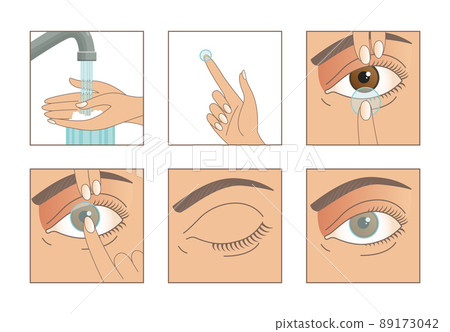
Contact lenses. Instruction how to put on lenses. 5 steps. Wash your hands, take a lens, check the position of the lens. Carefully insert the lens
Scale
* You can move the image by dragging it.


Credits(copyright) : Designer things / PIXTA
- About Model and Property Release
- Views : 292
- Past purchases : No
- Contact Contributor to Ask About This Item